The Daily and Weekly Rhythm
The things you do as engagement happens — confirming events, classifying capacity, logging support details, reviewing what changed. If these habits are consistent, the record builds itself.
Every event's dossier lets you:
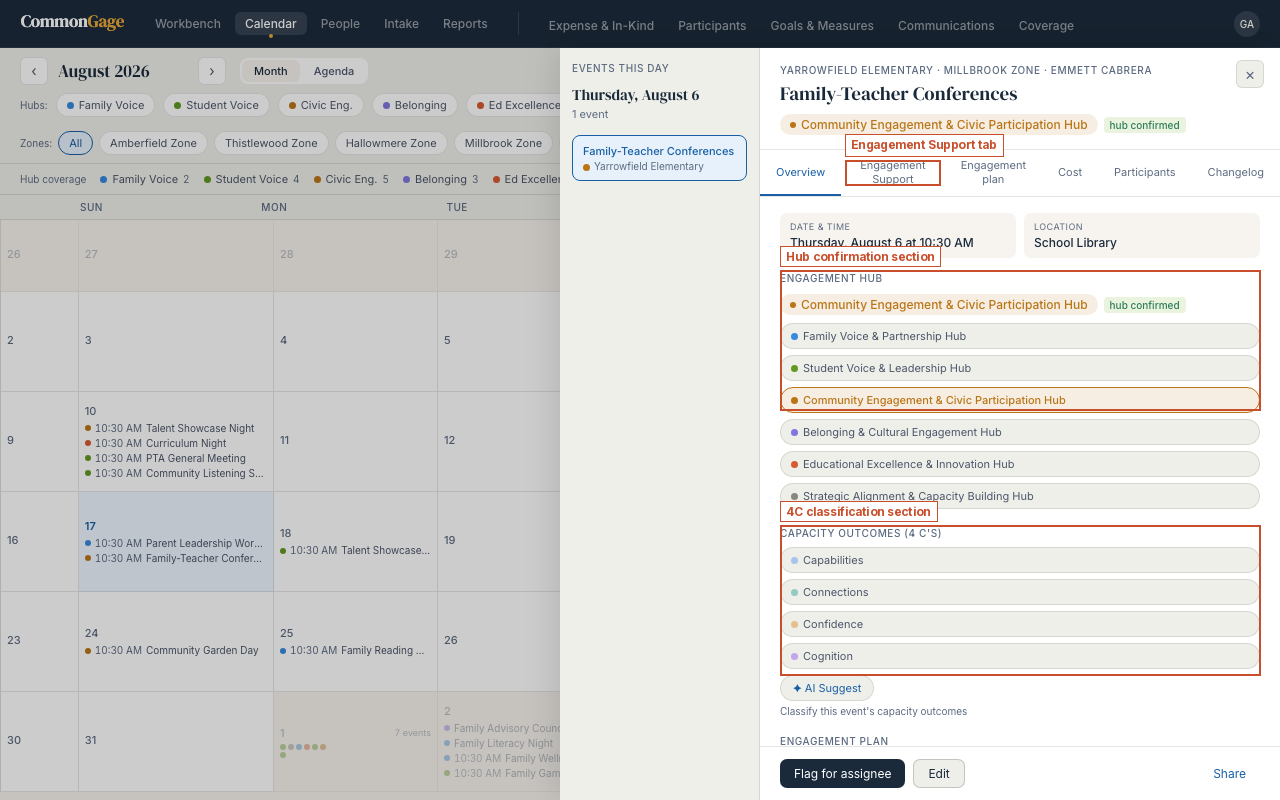
- Confirm the hub it belongs to
- Classify capacity outcomes against the four C's
- Log Engagement Support and cost details — language support, childcare, catering, coordination hours, and event cost
- Review the changelog — who changed what, and when
Task — Confirm a hub classification
- Open Calendar and click a day with an event on it. In the day panel that opens, click the event.
- In the event's dossier, find the Engagement Hub section near the top.
- An AI-suggested hub (marked "AI suggested") is a starting point, not a decision. Confirm it if it's right, or pick a different one from the six hub options if not. AI suggestions are available to anyone with edit access on that event, but a suggestion never counts in reports until you confirm it.
Task — Classify capacity outcomes (the 4 C's)
- In the same dossier, find Capacity Outcomes (4 C's), just below the hub list.
- Check whichever of the four apply to this event. More than one can apply; none is also a valid answer for an event that didn't build any of the four.
All capacity outcome classification uses the same Dual Capacity-Building Framework (Mapp, 2019):
| C | Color | Meaning |
|---|---|---|
| Capabilities | Blue | Building knowledge, skills, and confidence |
| Connections | Teal | Building relationships and networks |
| Confidence | Amber | Building agency and sense of efficacy |
| Cognition | Purple | Building understanding of roles and systems |
Task — Log engagement support details
- In the dossier, click the Engagement Support tab.
- Record what made the event accessible: language support provided, childcare, catering, and any coordination hours or cost that went into making it happen.
- None of this is required to save the event — but every field left blank is a field the year-end report can't report on.
Why this matters: every hub confirmation, every 4C tag, and every support record you log here flows directly into the reports you'll pull at the end of the year (see Pulling the Report). Skip this step, and those sections of your report will have gaps.